Automate
Make your phone or tablet smarter with automation

Make your phone or tablet smarter with automation
A decision block that waits for an custom interface to be clicked.
The fiber will pause until the interface has been clicked, or the interface was dismissed.
The NO path is executed if the interface has been dismissed.
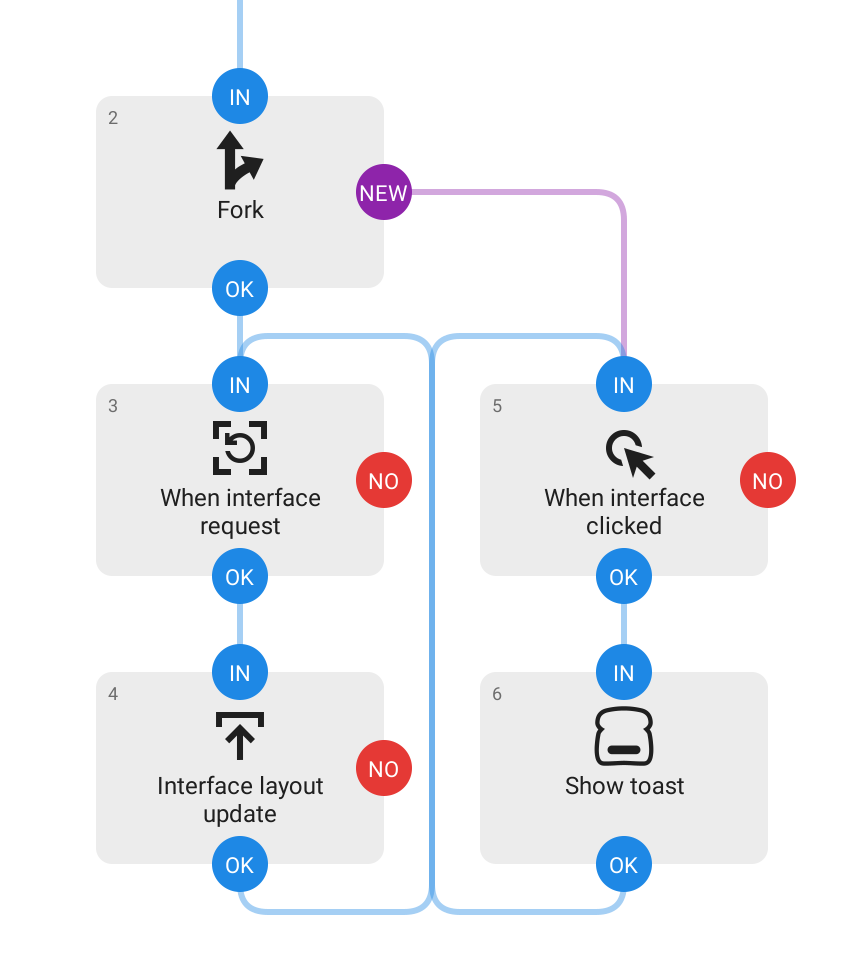
This block should be combined with a Fork block, connected to its NEW path, so the interface isn’t impeded from handling update requests, see partial example flow below.
For this block to react and UI element must be clickable and have an android:id attribute.
Note! This is an experimental feature, expect breaking changes. Not for production use.
null if a regular view was clicked.android:checked state of the view that was clicked, null if not an compound button. (Android 12+)