Automate
Make your phone or tablet smarter with automation

Make your phone or tablet smarter with automation
A decision block that await a request for an item as displayed by an adapter element in a custom interface.
The fiber will pause until the adapter has requested an item, or the interface was dismissed.
The NO path is executed if the interface has been dismissed.
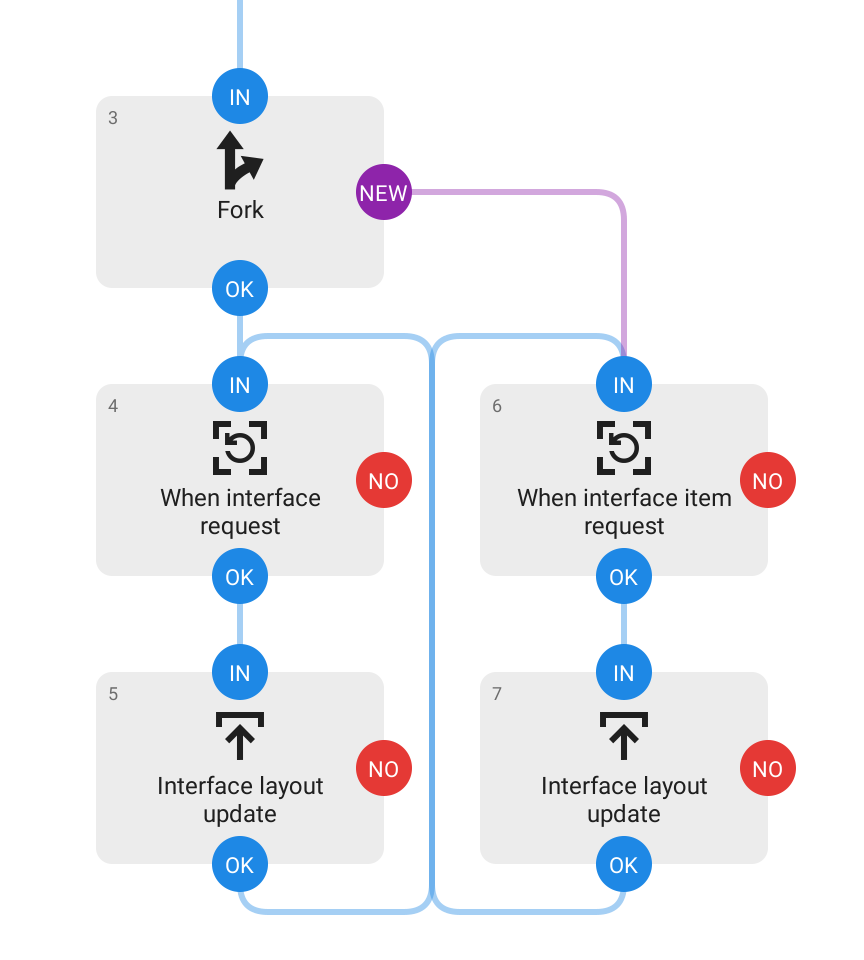
Use the Interface layout update block with adapter UI element id and item position to submit an initial or updated layout for an item.
This block should be combined with a Fork block, connected to its NEW path, so the interface isn’t impeded from handling update requests, see partial example flow below.
This block don’t accept an interface URI for the custom layouts in a notification since they don’t support adapter UI elements.
Note! This is an experimental feature, expect breaking changes. Not for production use.